Final Checklist Before Submitting Your Resume
You spent hours writing your resume, tailoring bullet points, and picking the right template. Then you hit submit and realize the phone number has a typo, the file is named "resume_final_FINAL_v3.docx," and half the formatting broke when you converted to PDF. A single overlooked detail can sink an otherwise strong application, and most of those details take less than two minutes to fix.

You spent hours writing your resume, tailoring bullet points, and picking the right template. Then you hit submit and realize the phone number has a typo, the file is named "resume_final_FINAL_v3.docx," and half the formatting broke when you converted to PDF. A single overlooked detail can sink an otherwise strong application, and most of those details take less than two minutes to fix.
Photo by Sora Shimazaki from Pexels
TL;DR:- Proofread with fresh eyes and at least one external tool before every submission.
- Verify format consistency: fonts, spacing, bullet styles, and margins should be uniform.
- Confirm ATS compatibility by using standard headings, a single-column layout, and a clean PDF or .docx file.
- Personalize each resume to the specific job description with matched keywords and reordered bullet points.
- Catch last-minute errors like wrong company names, broken links, and outdated contact info.
Why a final check matters
Sending 30 applications a week creates a rhythm that feels productive. But speed without a final review is just efficient self-sabotage. Recruiters spend an average of six to seven seconds on an initial resume scan. A misspelled company name or a broken email link burns most of that window on the wrong impression.
A structured checklist removes guesswork. Instead of scrolling through your resume and hoping nothing looks off, you verify each element against a concrete list. That is the difference between "I think it's ready" and "I know it's ready."
The checklist below covers five areas: proofreading, format consistency, ATS compatibility, personalization, and last-minute error prevention. Work through them in order. Each builds on the previous one.
Proofread for real errors

Spell check alone is not proofreading. Word processors catch "teh" but miss "manger" when you meant "manager." Here is a concrete approach:
- Read the resume backward, sentence by sentence. This breaks your brain's tendency to auto-correct familiar text.
- Read it out loud. Awkward phrasing that looks fine on screen sounds wrong when spoken. If you stumble, rewrite.
- Run it through a grammar tool like Grammarly or LanguageTool. These catch subject-verb disagreements, passive voice overuse, and inconsistent tense.
- Ask someone else to read it. A friend, a partner, a former colleague. Fresh eyes catch what yours skip.
- Verb tense consistency: current role in present tense, past roles in past tense.
- Punctuation at the end of bullet points: pick a style (periods or no periods) and stick with it.
- Capitalization of job titles: "Senior Marketing Manager" in a heading, "senior marketing manager" in running text.
- Numbers: spell out one through nine, use digits for 10 and above (or follow the job posting's style).
Check format consistency
Inconsistent formatting signals carelessness. A recruiter may not consciously notice that your bullet points switch from round to square halfway through, but it creates a subtle sense of disorder.
Here is what to verify:
- Font: one font for headings, one for body text. Two fonts maximum. Common safe choices: Calibri, Garamond, Cambria, Helvetica.
- Font size: 10-12pt for body, 14-16pt for your name, 12-14pt for section headings.
- Margins: 0.5 to 1 inch on all sides. Consistent on every page.
- Bullet style: the same symbol throughout. No mixing of dashes, dots, and arrows.
- Spacing: equal space between sections. If you use 6pt after each heading, use 6pt after every heading.
- Alignment: left-aligned text is safest. Centered text works for your name and contact info only.
A quick way to check: zoom out to 50% and look at the document as a visual shape. Both pages (if you have two) should look balanced. Dense blocks of text next to sparse sections indicate uneven formatting.
Verify ATS compatibility

Applicant Tracking Systems parse your resume before a human ever sees it. If the parser cannot read your file, your qualifications do not matter.
ATS compatibility comes down to structure:
- Use standard section headings: "Work Experience," "Education," "Skills," "Certifications." Creative headings like "Where I've Made an Impact" confuse parsers.
- Stick to a single-column layout. Two-column designs, sidebars, and text boxes break parsing order.
- Avoid headers and footers for critical info. Many ATS tools skip header/footer content entirely. Put your name and contact details in the main body.
- Submit as PDF or .docx, depending on what the job posting requests. If no format is specified, PDF preserves layout; .docx parses more reliably in older systems.
- Skip graphics, icons, and images. That skill-level bar chart showing "Python: 4/5" renders as nothing in most ATS tools.
- Use standard fonts. Custom or decorative fonts can cause character-mapping errors.
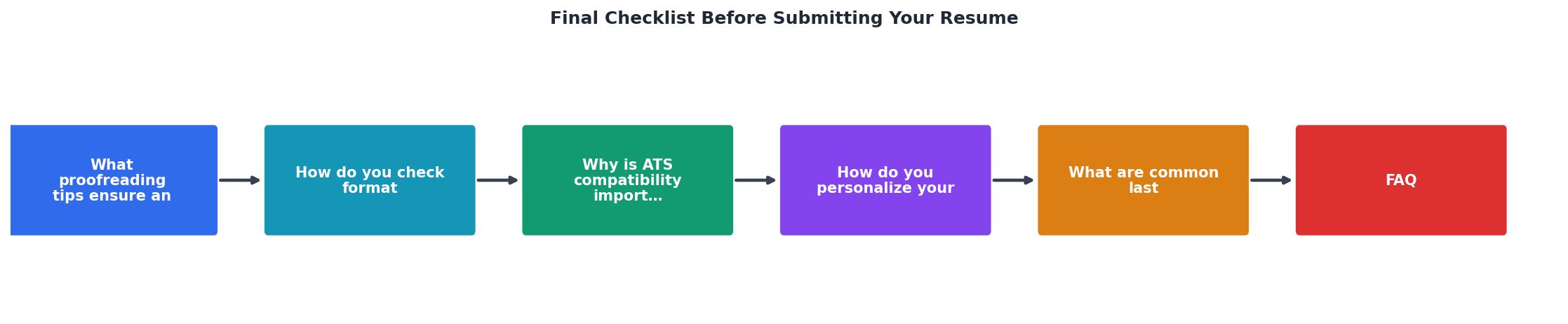
The diagram above shows the five-step flow: Proofread, Format Check, ATS Verify, Personalize, Final Review. Work through them sequentially. Skipping ahead creates gaps.
Personalize for each application

A generic resume is a gamble. A tailored resume is a strategy. Here is how to personalize without spending an hour per application:
- Mirror the job description's language. If the posting says "cross-functional collaboration," use that exact phrase instead of "worked with different teams."
- Reorder bullet points so the most relevant accomplishments appear first under each role. Recruiters read top-down and often stop after the first two or three bullets.
- Match the skills section to the posting's requirements. List the skills they ask for first, in the same order.
- Adjust your summary or objective (if you use one) to reference the specific role and company.
"The key to writing a successful Work Experience is to make them interesting and engaging.">, Final Resume Checklist Before Submitting Your CV!
Personalization is where most applicants cut corners because it takes time. That is exactly why doing it gives you an edge. When 80% of applicants send the same generic document, the 20% who tailor stand out immediately.
| Generic Resume | Tailored Resume |
|---|---|
| Same document for every job | Adjusted keywords per posting |
| Skills listed in random order | Skills matched to job requirements |
| Summary mentions broad goals | Summary references specific role |
| Bullet points unchanged | Top bullets reordered for relevance |
| Lower interview callback rate | Significantly higher callback rate |
Avoid last-minute errors
These are the mistakes that happen in the final 60 seconds before clicking "Submit." They are embarrassingly common and entirely preventable.
- Wrong company name. If you tailored your summary for Company A and forgot to update it for Company B, that is an instant rejection.
- Outdated contact info. Old phone number, previous email address, or a LinkedIn URL that leads to a 404.
- Wrong file name. "Resume_Google_2026.pdf" sent to Amazon tells the recruiter you are mass-applying without attention. Use a clean format:
FirstName_LastName_Resume.pdf. - Broken hyperlinks. If your resume includes links to a portfolio, GitHub, or LinkedIn, click every single one before submitting.
- Extra pages of blank space. A formatting change can push content to a second page with three lines and a lot of white space. Check page count.
- Tracked changes or comments visible. If you edited in Word with track changes on, accept all changes and delete all comments before exporting.
Here is an interactive overview of the key areas your final check should cover, along with typical error rates for each category:
Pre-Submission Resume Checklist
Use this checklist every time you submit an application. Print it, bookmark it, or keep it open in a tab.
Final Resume Submission Checklist
Your progress is saved automatically in your browser.
FAQ
Frequently Asked Questions
FirstName_LastName_Resume.pdf. Avoid version numbers, dates, or company names in the file name. A recruiter downloading 50 resumes will appreciate being able to find yours by name. Never submit a file called "resume.pdf" or "final_version_3.docx."What is the one item on this checklist you always forget? Drop it in the comments so others can learn from the same mistake.
Additional Resources
- Final Resume Checklist Before Submitting Your CV! - The first thing to check is your professional summary. Keep it to max 3-4 sentences. First, keep your professional summary short & sweet. Keep your resume ...
- The 'Perfect Resume' Checklist - What you should look out for: Written in the first person (I, me, my) Missing periods or commas Adding apostrophes where they don't belong Mistaken synonyms
- Resume Critique Checklist | University Human Resources - Are all resume sections clearly labeled? · Are sections placed in an order that highlights the applicant's strongest credentials for the position? · Is the work ...

Get the 356 complete recruitment audit (free PDF)
Download the free PDF with 356 reasons hiring stalls, plus optional daily email tips. No credit card.
Get the free PDF 356 reasons · Free download