Checklist: ATS-friendly Project Manager resume (2027)
You have managed million-dollar budgets, coordinated cross-functional teams of 30 people, and delivered projects ahead of schedule. None of that matters if an applicant tracking system discards your resume before a recruiter ever sees it. This checklist gives you every formatting rule, keyword strategy, and section requirement you need to get your Project Manager resume through ATS filters and onto a hiring manager's desk in 2027.

You have managed million-dollar budgets, coordinated cross-functional teams of 30 people, and delivered projects ahead of schedule. None of that matters if an applicant tracking system discards your resume before a recruiter ever sees it. This checklist gives you every formatting rule, keyword strategy, and section requirement you need to get your Project Manager resume through ATS filters and onto a hiring manager's desk in 2027.
Photo by Jakub Zerdzicki from Pexels
TL;DR:- Use a single-column layout, standard section headings, and a .docx or plain PDF format so ATS parsers read every line correctly.
- Mirror exact keywords from the job posting: tool names (Jira, MS Project, Asana), certifications (PMP, PRINCE2), and methodology terms (Agile, Waterfall, hybrid).
- Quantify results with numbers (budget size, team size, schedule variance, cost savings) in every bullet point you write.
- Run your final draft through an ATS-matching tool like Resume Hedgehog to catch gaps before you hit "Apply."
Why ATS compliance matters for PMs
Most mid-to-large companies route every application through an ATS. The system scores your resume against the job description, and low-scoring files never reach a human. Project Manager roles attract high volumes of applicants, which means recruiters lean on automated filtering even more.
That number is not a scare tactic. It reflects how aggressively companies filter when a single PM opening draws 200+ applications. The fix is not complicated, but it is specific. You need the right structure, the right keywords, and zero formatting tricks that confuse parsers.
The gap between knowing you are qualified and proving it to a machine is where most applications die. This checklist closes that gap section by section.
Common mistakes that kill PM resumes

Here are the errors I see over and over in PM resumes that get rejected:
- Fancy templates with columns, icons, and graphics. Two-column layouts confuse most ATS parsers. Icons for phone numbers or email addresses get read as garbled text. Stick to one column.
- Headers and footers containing contact info. Many ATS tools skip header/footer content entirely. Your name and phone number vanish.
- Listing responsibilities instead of results. "Managed project timelines" tells a recruiter nothing. "Delivered 12 software releases on schedule across a 14-month program, reducing time-to-market by 18%" tells them everything.
- Generic skill lists. Writing "leadership" and "communication" without context wastes space. The ATS is looking for specific tools and certifications, not soft-skill buzzwords.
- Saving as a designed PDF. Some design tools export PDFs with text embedded as images. The ATS reads zero words. Export from Word or Google Docs instead.
Step-by-step: build your ATS-ready PM resume
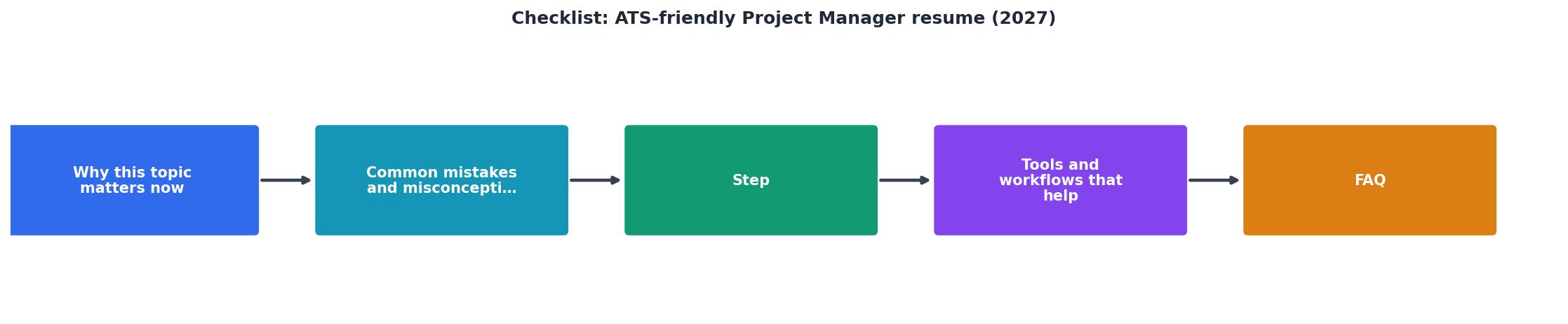
Follow these steps in order. Each one builds on the previous.
Step 1: Extract keywords from the job posting
Open the job description. Highlight every hard skill, tool, certification, and methodology mentioned. Common PM keywords in 2027 postings include:
- Tools: Jira, Microsoft Project, Asana, Monday.com, Smartsheet, Confluence, ServiceNow
- Certifications: PMP, PRINCE2, CSM (Certified ScrumMaster), PMI-ACP, SAFe Agilist
- Methodologies: Agile, Scrum, Kanban, Waterfall, hybrid, Lean, Six Sigma
- Domain terms: stakeholder management, risk mitigation, resource allocation, earned value management, sprint planning, release management
Step 2: Structure with standard headings
Use these exact section titles. ATS parsers are trained on them:
- Contact Information (at the top, not in a header)
- Professional Summary
- Work Experience
- Education
- Certifications
- Skills
Step 3: Write a keyword-rich summary
Your Professional Summary sits right below your contact info. Keep it to 3-4 sentences. Pack it with the top keywords from Step 1 and your strongest metrics.
Example: PMP-certified Project Manager with 8 years leading Agile and hybrid software delivery programs. Managed cross-functional teams of up to 25 across 3 time zones using Jira and Confluence. Delivered a $4.2M platform migration 6 weeks ahead of schedule with 99.7% uptime during cutover.
Step 4: Quantify every bullet
Each role in your Work Experience section needs 4-6 bullets. Every bullet should contain at least one number. Use this formula: Action verb + what you did + measurable result.
- Reduced project delivery cycle from 16 weeks to 11 weeks by implementing Kanban boards in Jira, saving $320K annually.
- Led a 22-person cross-functional team through SOC 2 compliance, achieving certification 3 months ahead of the audit deadline.
- Managed a $2.8M annual budget with less than 2% variance across 4 consecutive quarters.
Step 5: Format for machines, not designers
- Font: Arial, Calibri, or Times New Roman at 10-12pt.
- File format: .docx unless the posting specifically requests PDF. If PDF, export from Word.
- Margins: 0.5" to 1".
- No images, charts, or logos.
- No text boxes.
"Interview Guys Tip: The DOCX template is fully editable, allowing you to adjust fonts, colors, and spacing to match your personal brand while maintaining professional formatting.">, Free Project Manager Resume Template 2026: ATS Ready Examples and Writing Guide
Step 6: Test and iterate
Before submitting, run your resume against the actual job description using an ATS-matching tool. Resume Hedgehog lets you upload your resume and paste the job posting to see exactly which keywords you are missing and how well your document matches. Fix the gaps, re-test, submit.
Tools and workflows that speed this up

You do not need to start from scratch for every application. Build a master resume that contains every role, every bullet, every certification you have earned. It can be 4-5 pages. Nobody sees this document. It is your source file.
For each application, copy the master, delete irrelevant bullets, and reorder the remaining ones so the most relevant experience appears first. Then run it through keyword matching.
Here is a realistic example of what an ATS score dashboard looks like when you compare your resume against a job posting:
ATS Match Score: PM Resume vs. Job Posting
That yellow row for "Tools Mentioned" is exactly the kind of gap you catch before submitting. Add the two missing tools (say, Smartsheet and ServiceNow), re-test, and the score jumps to 90%+.
A solid workflow looks like this:
- Save the job posting as a text file the moment you find it (postings get taken down).
- Open your master resume.
- Tailor bullets and keywords to the posting.
- Run the ATS match check.
- Fix gaps.
- Export as .docx.
- Submit.
The complete PM resume checklist

Use this checklist every time you submit a PM application. Print it, bookmark it, tape it to your monitor.
ATS-Friendly Project Manager Resume Checklist (2027)
Your progress is saved automatically in your browser.
FAQ
Frequently Asked Questions
What is the one section of your PM resume that you find hardest to optimize for ATS? Drop your answer below and let's figure it out together.
You have managed cross-functional teams, delivered projects on time, and kept stakeholders happy for years. Yet your resume keeps vanishing into a digital void, and the interview invitations never arrive. The problem is almost never your experience. It is how your resume talks to the software that reads it before any human does. This checklist gives you every formatting rule, keyword strategy, and structural fix you need to get your Project Manager resume past ATS filters in 2027.
Photo by Jakub Zerdzicki from Pexels
TL;DR:- Use a single-column layout, standard section headings, and a .docx or plain PDF format so ATS parsers read every line correctly.
- Mirror exact keywords from the job posting: tool names (Jira, MS Project, Asana), certifications (PMP, PRINCE2), and methodology terms (Agile, Scrum, Waterfall).
- Quantify every achievement with numbers: budgets managed, team sizes led, percentage improvements delivered.
- Run your resume through a keyword-matching tool like Resume Hedgehog before each submission to catch gaps.
Why ATS compliance matters in 2027
Most large and mid-size employers route every application through an Applicant Tracking System before a recruiter sees it. The software parses your resume, extracts data, and scores it against the job description. If your formatting confuses the parser or your keywords miss the mark, you are filtered out automatically.
That number is not shrinking. Companies are processing more applications than ever, and ATS vendors keep tightening their parsing algorithms. For Project Managers specifically, the keyword landscape has shifted: employers now screen for hybrid methodology fluency, stakeholder management frameworks, and specific tool stacks alongside traditional PMP credentials.
The good news? ATS rules are predictable. Follow them, and your resume reaches the hiring manager's screen every time.
Common mistakes that kill PM resumes
Here are the errors I see most often on Project Manager resumes that claim to be "ATS-optimized" but still get rejected:
- Fancy templates with columns and sidebars. Two-column layouts break parsing. The ATS reads left-to-right, top-to-bottom. A sidebar with your skills list gets merged into random sentences.
- Graphics, icons, and progress bars inside the PDF. That little bar chart showing "MS Project: 90%" is invisible to the parser. It sees nothing.
- Headers and footers containing contact info. Many ATS tools skip header/footer regions entirely. Your phone number and email vanish.
- Generic skill lists without context. Writing "Leadership" or "Communication" without tying them to measurable outcomes adds zero keyword value.
- One resume for every job. A PM role at a fintech startup and a PM role at a healthcare enterprise use different vocabulary. Sending the same document to both is a coin flip at best.
Step-by-step: build your ATS-ready PM resume
Follow these steps in order: Parse job posting, Extract keywords, Structure sections, Quantify achievements, Format for ATS, Test and submit.
Parse the job posting
Read the job description three times. On the first pass, highlight every hard skill and tool name: Jira, Confluence, MS Project, Smartsheet, Monday.com. On the second pass, mark methodology terms: Agile, Scrum, Waterfall, SAFe, Kanban. On the third pass, note soft skill phrases the employer uses: "cross-functional collaboration," "executive stakeholder reporting," "risk mitigation."
Extract and prioritize keywords
List every keyword you found. Rank them by frequency in the posting. If "Agile" appears four times and "Waterfall" appears once, Agile is the priority keyword. Your resume should mention it in your summary, in at least two bullet points, and in your skills section.
Structure with standard headings
Use these exact section titles so the ATS maps your data correctly:
- Professional Summary (not "About Me" or "Profile")
- Work Experience (not "Career Journey" or "Where I've Been")
- Education
- Certifications (separate from Education)
- Skills (a flat list, no graphics)
Quantify every achievement
Recruiters and ATS scoring algorithms both reward specifics. Compare these two bullet points:
Managed a team and delivered projects on time.- Led a 12-person cross-functional team delivering 8 software releases over 18 months, reducing time-to-market by 22% and staying $140K under budget.
"Interview Guys Tip: The DOCX template is fully editable, allowing you to adjust fonts, colors, and spacing to match your personal brand while maintaining professional formatting.">, Free Project Manager Resume Template 2026: ATS Ready Examples and Writing Guide
Format for machine readability
- Save as .docx or a text-based .pdf (not a scanned image).
- Use standard fonts: Arial, Calibri, Times New Roman, or Garamond.
- Set font size between 10pt and 12pt for body text.
- Avoid tables for layout. Use them only for simple data if needed.
- No text boxes, no watermarks, no embedded charts.
Test before you submit
Paste the job description and your resume into a keyword-matching tool. Resume Hedgehog does exactly this: upload your resume, paste the job description, and get an optimized, ATS-friendly version back. It catches missing keywords you overlooked and restructures phrasing to match what the ATS expects.
PM-specific keywords for 2027
The Project Manager keyword landscape has evolved. Here is a snapshot of what ATS systems screen for right now, organized by category.
The following dashboard shows the keyword categories and their relative weight in typical PM job postings across tech, construction, and healthcare sectors:
PM Resume Keyword Weight by Category
Tools & Software: Jira, Confluence, MS Project, Smartsheet, Monday.com, Asana, Azure DevOps, ServiceNow, Tableau (for reporting dashboards).
Methodologies: Agile, Scrum, Kanban, Waterfall, SAFe, Lean, Six Sigma, Hybrid.
Certifications: PMP, PRINCE2, CSM (Certified ScrumMaster), PMI-ACP, CAPM, Six Sigma Green/Black Belt.
Quantified results: Budget figures, team sizes, project counts, percentage improvements, revenue impact, cost savings.
Soft skill phrases: Stakeholder management, cross-functional leadership, risk assessment, vendor negotiation, executive reporting, change management.
Formatting do's and don'ts
| Do This | Not This |
|---|---|
| Single-column layout | Two-column or sidebar designs |
| Standard section headings | Creative headings like "My Toolbox" |
| .docx or text-based PDF | Image-based PDF or Canva export |
| Bullet points with metrics | Long narrative paragraphs |
| 10-12pt standard fonts | Decorative or script fonts |
| Plain text skills list | Icon-based skill ratings |
| Contact info in body text | Contact info in header/footer |
ATS-Friendly PM Resume Checklist (2027)
Your progress is saved automatically in your browser.
FAQ
Frequently Asked Questions
What is the one formatting mistake on your current resume that you suspect is costing you interviews? Drop it in the comments and let's troubleshoot it together.
Additional Resources
- Build a Resume That Stands Out for Project Manager Roles - 1. Lead with a summary that speaks to the role · 2. Quantify everything you can · 3. Use the right project management language · 4. Make ...
- Free Project Manager Resume Template 2026: ATS Ready ... - Download our free project manager resume template for 2026. ATS-optimized examples, expert tips, and keyword strategies to land your next PM ...
- 4 Best IT Project Manager Resume Examples and ... - An ATS-friendly template is a solid alternative. Whichever you choose, keep the formatting clean and easy to parse: clear section headings, a ...

Get the 356 complete recruitment audit (free PDF)
Download the free PDF with 356 reasons hiring stalls, plus optional daily email tips. No credit card.
Get the free PDF 356 reasons · Free download