Finding the Right Keywords for an Accounting Resume
You send out dozens of accounting resumes and hear nothing back. The qualifications are there, the experience checks out, and yet the phone stays silent. The problem is almost never your skills. It is the specific words on your resume that automated screening software looks for and does not find.

You send out dozens of accounting resumes and hear nothing back. The qualifications are there, the experience checks out, and yet the phone stays silent. The problem is almost never your skills. It is the specific words on your resume that automated screening software looks for and does not find. Picking the right keywords closes that gap between a qualified candidate and an invited candidate.
Photo by RDNE Stock project from Pexels
TL;DR:- Most accounting resumes get rejected by ATS software before a human reads them because they lack exact keyword matches from the job posting.
- Pull keywords directly from each job description, map them to your real experience, and place them in your summary, skills section, and bullet points.
- Customizing keywords per application dramatically increases interview callbacks compared to sending one generic resume everywhere.
Why Keywords Decide Your Fate
Applicant Tracking Systems parse your resume the moment you hit submit. They score it against the job description. If the overlap is low, a recruiter never sees your name. This is not a theory. It is how the majority of mid-to-large accounting firms and corporate finance departments filter candidates.
That number means three out of four resumes disappear into a digital void. For accounting roles specifically, the filtering is strict because job descriptions tend to list precise technical skills: GAAP, reconciliation, tax compliance, ERP systems. Miss those exact terms and the system scores you low regardless of your ten years closing month-end books.
The fix is straightforward. You need to identify the keywords each employer cares about and place them where ATS parsers look first.
Essential Accounting Keywords

Not all keywords carry equal weight. They fall into three categories: technical skills, software proficiency, and soft skills with measurable context. Here is what hiring managers and ATS systems scan for most often in accounting resumes:
Technical skills:- Generally Accepted Accounting Principles (GAAP)
- Accounts payable / accounts receivable (AP/AR)
- Financial statement preparation
- Bank reconciliation
- Tax preparation and compliance
- Budgeting and forecasting
- Audit (internal and external)
- Cost accounting
- Revenue recognition
- Fixed asset management
- QuickBooks, Xero, FreshBooks
- SAP, Oracle NetSuite, Microsoft Dynamics
- Advanced Excel (VLOOKUP, pivot tables, macros)
- Hyperion, Adaptive Insights
- Bloomberg Terminal (for corporate finance crossover roles)
- CPA (Certified Public Accountant)
- CMA (Certified Management Accountant)
- CIA (Certified Internal Auditor)
- EA (Enrolled Agent)
"Does your resume contain all the right skills?">, Resume Skills and Keywords for Accounting (Updated for 2026)
The answer to that question changes with every job posting. A staff accountant role at a manufacturing company will emphasize cost accounting and ERP experience. The same title at a public accounting firm will prioritize audit procedures and GAAP compliance. Treat each posting as its own keyword source.
Where to Place Keywords
Dropping a wall of keywords into a skills section and calling it done is a common mistake. ATS algorithms weigh keyword placement differently depending on where terms appear.
The experience section carries the most scoring weight because it shows keywords in context. A bullet point that reads "Performed monthly bank reconciliations for 12 subsidiary accounts using Oracle NetSuite" hits three keywords at once and proves you actually used those skills.
Here is the placement hierarchy that works:
- Professional summary (top of resume): Include 3-4 high-priority keywords naturally. Example: "CPA with 6 years of experience in financial statement preparation, tax compliance, and budgeting for mid-market manufacturing firms."
- Experience bullets: Weave keywords into accomplishment statements. Quantify where possible.
- Skills section: List remaining keywords the ATS needs to find. Group them logically (Technical Skills, Software, Certifications).
- Education and certifications: Spell out credential names fully and include abbreviations. Write "Certified Public Accountant (CPA)" so both forms get matched.
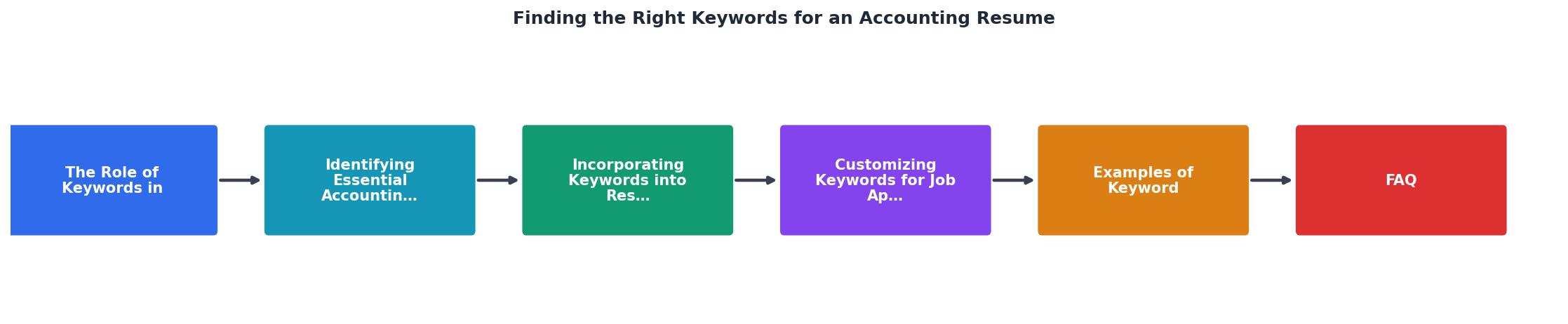
Follow the steps in the diagram: Read posting, Extract keywords, Map to experience, Place in sections, Review and submit. Each step takes minutes, not hours, and the payoff compounds across every application.
Customizing Keywords Per Role

A single generic resume sent to 50 different accounting jobs will underperform a tailored resume sent to 10. The math is simple: a customized resume matches more keywords, scores higher in ATS, and reaches more human eyes.
Here is how to customize efficiently:
- Highlight the job posting. Literally highlight or bold every noun, skill, and tool mentioned. These are your target keywords.
- Compare against your master resume. Keep one comprehensive document with every skill, project, and accomplishment you have ever had. Pull relevant items for each application.
- Swap synonyms for exact matches. If your master resume says "ledger management" but the posting says "general ledger maintenance," use their version.
- Prioritize repeated terms. If "financial reporting" appears three times in a posting, it is a high-priority keyword. Make sure it shows up at least twice in your resume.
Generic Resume
Tailored Resume
That gap between 38% and 87% is the difference between silence and an interview invitation. Tools like Resume Hedgehog automate this matching process: upload your resume, paste the job description, and get an optimized version with the right keywords already placed.
Real Keyword Examples by Role

Different accounting positions demand different keyword sets. Here are three common roles with their top-priority keywords:
Staff Accountant:- Journal entries, month-end close, account reconciliation, GAAP, Excel, general ledger, accruals, variance analysis
- Tax returns (1040, 1120, 1065), tax planning, IRS compliance, state and local tax (SALT), tax provisions, ASC 740, research credits
- Financial modeling, forecasting, P&L analysis, budget variance, data visualization, Power BI, scenario analysis, capital expenditure
| Staff Accountant | Tax Accountant | Senior Financial Analyst |
|---|---|---|
| Journal entries | Tax returns (1040, 1120) | Financial modeling |
| Month-end close | IRS compliance | P&L analysis |
| Account reconciliation | SALT | Budget variance |
| GAAP | ASC 740 | Forecasting |
| General ledger | Tax provisions | Power BI |
Notice how little overlap exists between these three roles. Sending the same keyword set to all three guarantees a low match rate on at least two of them.
Accounting Resume Keyword Optimization Checklist
Your progress is saved automatically in your browser.
FAQ
Frequently Asked Questions
What keyword strategy has worked best for your accounting job search? Share what you have tried and what actually moved the needle.
Additional Resources
- 65 Accounting Resume Buzzwords (With Importance and ... - Fit the job description: Buzzwords work to gain the attention of the hiring manager, but including terms that fit the tasks and skills listed. ...
- Accounting Resume Keywords: How to Match Job ... - How to find the right accounting resume keywords for your target job · Step 1: Collect job postings (3–5 is enough) · Step 2: Highlight repeated ...
- Accounting Resume Keywords and Skills (Hard Skills) - Accounting Resume Keywords and Skills (Hard Skills) · Accounting · Financial Reporting · Financial Analysis · Account Reconciliation · Financial Accounting ...

Get the 356 complete recruitment audit (free PDF)
Download the free PDF with 356 reasons hiring stalls, plus optional daily email tips. No credit card.
Get the free PDF 356 reasons · Free download