Using Resume Hedgehog to Pass ATS Screening
Every job seeker's nightmare: spending hours crafting the perfect resume, only to have it vanish into the abyss of an Applicant Tracking System (ATS). Resume Hedgehog offers a solution by optimizing resumes to pass ATS screenings with ease. By leveraging its effective features like keyword analysis and customization tips, you can ensure your resume stands out and lands in human hands. Here's how to use Resume Hedgehog to improve your chances of getting noticed.


Every job seeker's nightmare: spending hours crafting the perfect resume, only to have it vanish into the abyss of an Applicant Tracking System (ATS). Resume Hedgehog offers a solution by optimizing resumes to pass ATS screenings with ease. By leveraging its effective features like keyword analysis and customization tips, you can ensure your resume stands out and lands in human hands. Here's how to use Resume Hedgehog to improve your chances of getting noticed.
Photo by Markus Winkler from Pexels
TL;DR
- Utilize Resume Hedgehog's keyword analysis to tailor your resume for ATS.
- Follow the step-by-step guide to upload and refine resumes for multiple applications.
- Benefit from user testimonials and see real-world results.
What is Resume Hedgehog and How Does It Help with ATS?
Applicant Tracking Systems (ATS) are used by many companies to filter resumes before they reach a human recruiter. These systems scan for specific keywords and qualifications, often discarding resumes that don't match the criteria. This can be a frustrating hurdle for job seekers who may be perfectly qualified but fail to include the right terms.

Resume Hedgehog simplifies this process by analyzing job descriptions and identifying the most relevant keywords. This allows users to tailor their resumes to match the job posting more closely, increasing the likelihood of passing the ATS screening.
How to Perform Keyword Analysis Using Resume Hedgehog
Performing a keyword analysis is the first step in optimizing your resume for ATS. Here's how you can do it using Resume Hedgehog:
- Upload Your Resume: Start by uploading your current resume to the Resume Hedgehog platform.
- Paste the Job Description: Copy and paste the job description of the position you're applying for into the tool.
- Run the Analysis: The tool will analyze the job description and your resume, highlighting any missing keywords or phrases.
- Incorporate Keywords: Adjust your resume by adding the suggested keywords where applicable.
What Customization Tips Does Resume Hedgehog Offer?
Resume Hedgehog not only helps with keyword analysis but also provides valuable customization tips to enhance your resume further. Here are some features you can leverage:
- Tailored Suggestions: Receive specific suggestions on how to rephrase sections of your resume to better align with the job description.
- Formatting Advice: Ensure your resume is formatted in a way that is both ATS-friendly and visually appealing to human readers.
- Content Optimization: Highlight achievements and experiences that are most relevant to the position.

How to Upload and Refine Resumes for Job Applications
Uploading and refining your resume for different job applications can be time-consuming. Resume Hedgehog streamlines this process with an intuitive interface and clear steps:
- Upload Resume and Job Description: Start by uploading your resume and pasting the job description.
- Analyze and Adjust: Use the tool to analyze the job description and adjust your resume accordingly.
- Refine and Save: Make any necessary refinements based on the tool’s suggestions and save the updated resume.
- Repeat for Multiple Applications: Easily repeat the process for different job applications, ensuring each resume is tailored to the specific role.
User Testimonials and Comparison of Results
Real-world feedback is invaluable. Users have reported significant improvements in their job search outcomes after using Resume Hedgehog. Many have seen their interview rates increase dramatically, attributing this success to the tool's ability to optimize resumes for ATS.
In comparison to generic resumes, those refined with Resume Hedgehog tend to perform better in ATS screenings, leading to more interview opportunities.
Your Interactive Visual Guide
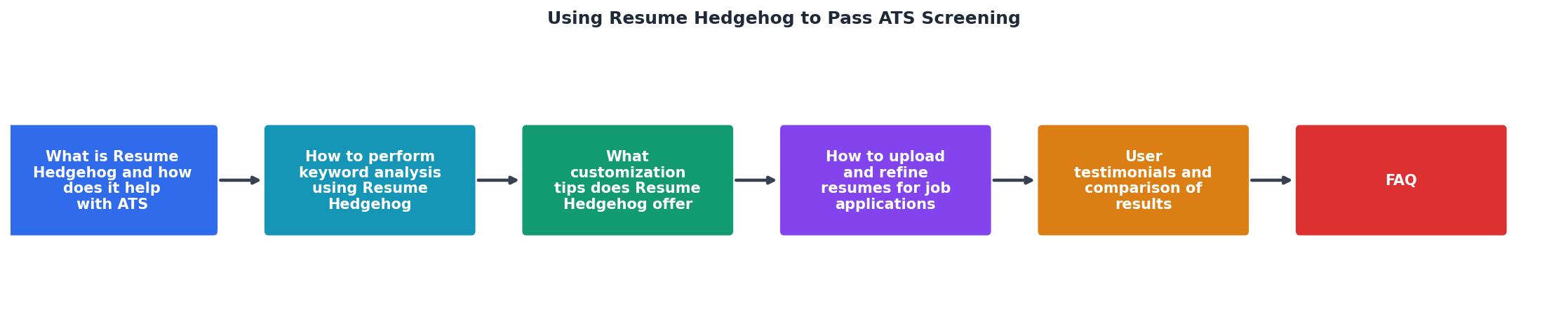
To better understand how Resume Hedgehog can assist you, here's an interactive visual guide to illustrate the process of optimizing your resume for ATS success.
ATS Optimization Steps
FAQ
Frequently Asked Questions
Are you ready to transform your job search strategy and increase your chances of landing that perfect interview? Share your thoughts and experiences in the comments below!
Additional Resources
- 18 Tips To Pass Automated Screening Resume Software - Use concise and direct language in your resume. Incorporating unique phrases in your resume can help human recruiters remember your application.
- I Tested 5 Resumes Against Sim ATS: Here's What Actually ... - I recently developed Resume Hedgehog to solve a specific annoyance: you provide your resume and a job offer, and it generates an optimized PDF ...
- Optimizing Resumes for Applicant Tracking Systems (ATS) - Not all ATS systems can read .docx, PDF, RTF, and JPG formats. 2. Use simple formatting. Do not use headers (including for contact information), footers ...

Get the 356 complete recruitment audit (free PDF)
Download the free PDF with 356 reasons hiring stalls, plus optional daily email tips. No credit card.
Get the free PDF 356 reasons · Free download